Click Here To Go To My EVALUATION

Thursday, 19 November 2009

Preliminary Story Boards

Preliminary Task – Evaluation

Continuity task involving filming and editing a character opening a door, crossing a room and sitting down in a chair opposite another character, with whom she/he then exchanges a couple of lines of dialogue.
This task should demonstrate match on action, shot/reverse shot and the 180-degree rule.

Planning and Creating a Storyboard
Our first step was to create a story board outlining and describing the shots, dialogue, sound, special effects, lighting and camera movement. The story board is split up into four main sections:
• An image of the shot and layout
• The type of shot
• The transition, dialogue, sound, special effects, lighting and camera movement.
• The timing

The story boards image has include everything that would be in the shot. We decided to give our story a “Hitman” type theme, a mans last resort is to revert back to his old ways and go to a “Mob Boss” for work. We needed our shots to reflect this theme and make sure the audience understand the image we are trying to create.

Our final story consisted of 10 boards, we had to decide were we would demonstrate each of the shots in our task breif. We concluded that match on action would be best used in the final shot were the character gets up from the chair, then leaves the room through the door. We first show the character getting up, a short time gap and then a shot of the character leaving the room.

Filming and Recording
At first we tryed to film the shots without the use of a “tripod”, this didn’t work too well as the shots turned out shaky and amateur. Our first strategy was to film all the shots continuously and cut the gaps and mistakes out during the editing process. This proved too dificult as we had to keep referring to our story boards and stopping and starting. To contain the 180 degree rule, we made sure we stayed on one half of the table. Our next strategy was to film each shot seperately, and so after each cut we could brief the characters and refer to the story boards at the end of each cut.

Editing the Film in iMovie
After we finished filming, we uploaded our footage on to an Apple Mac and used the software iMovie to edit it. We cut out any mistakes, background noise or excess footage and then put the footage all in to one continuous movie.

Wednesday, 18 November 2009

What is a Thriller?

A suspenseful adventure story or play or movie. A genuine thriller film pursues one goal to keep people "Thrilled" and keep them in suspense or cliffhanging. The pressure normally occurs when the main character is put in to a hazardous situation or mission which seems almost impossible. Plots of thrillers usually involve a mysterious or shadowy menace.
See Imdbs Top Rated "Thriller" Titles

Other Genres linked to Thriller Films...

there are many sub-genres under the genre "Thriller", some of these include: action thriller,Conspiracy thriller, Crime thriller, Disaster thriller, Drama thriller, Eco-thriller, Erotic thriller, Legal thriller, Medical thriller, Political thriller, Psychological thriller, Spy thriller , Techno-thriller, Religious thriller.

Problems when examining the Thriller genre

The most common problem is that people normally mistake a Thriller for a Horror.
Hybrids:
Most thrillers are often hybrids, this means that they are combined together with another genre
For Example "Action Thriller" or "Sci-Fi Thiller"
This means that it could be difficult to exactly define or examine the Thriller genre based as it can be hard to determine whether it is a genuine Thriller or a Hybird.

The Features of a Thriller Film

The usual features of a Thriller film include a mental, emotional or physical battle between a character (hero/heroine) and a more powerful, better equipped villain. The villain can take many forms in a Thriller and sometimes can even be the main character, an emotional battle within ones self. There are usually many plot twists and normally lives are at stake, but more than likely it will be a character fighting for a cause whether it be slow paced and involving a great deal of character development or fast paced and racing against the clock containing lots of violence.

Types of Thriller Characters

Characters in thrillers include: convicts, criminals, stalkers, assassins, down-on-their-luck losers, innocent victims (often on the run), prison inmates, menaced women, characters with dark pasts, psychotic individuals, terrorists, cops and escaped cons, fugitives, private eyes, drifters, duplicitious individuals, people involved in twisted relationships, world-weary men and women, psycho-fiends, and more.


Frequent Themes of Thrillers and AFIs top 3 most thrilling films!

The themes of Thrillers frequently include terrorism, political conspiracy, pursuit, or romantic triangles leading to murder.

AFI decided that these films were the top 3 most thrilling films:
(Hover mouse over images to see enlarged view)

1. 2.
3.

Who is the "Master Of Suspense"? Dun Dun Dun...

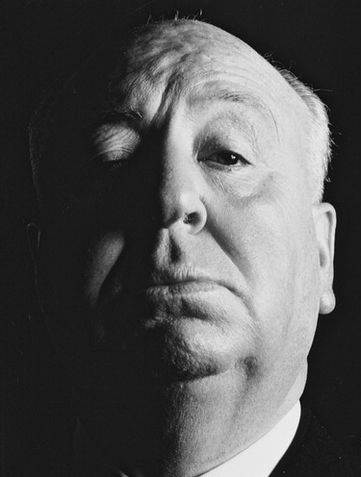
Sir Alfred Joesph Hitchcock is a British/American filmmaker. He helped make the modern day Thriller genre what it is today, beginning with his early silent films.

He was given this title because he had the ability to manipulate his audience's fears and desires, and take his viewers into "shoes of the character", making them feel the reality of the presented situation.


His first film released in 1927 was entitled "The Lodger:A Story Of The London Fog", which is about a landlady who suspects her new lodger is "the madman" killing women in London. There is one main difference between his first film and his films of today and that is that his early films were silent, unlike the ones today.

Hitchcock's films often contained many conventions, he would place an innocent victim into a strange, life-threatening situation, normally due to mistaken identity, misidentification or wrongful accusation. He would often interweave a taboo or sexually-related theme into his films which, in the days of his early releases, was a very rare thing.

Early Thriller Victims...Coincidence or Conspiracy?

It seems that the following films:
Gaslight, Laura, The Spiral Staircase, The Lady from Shanghai and Sorry, Wrong Number
Have something in common...
This isn't a conspiracy, the victims from these early thriller films are all women! It seems that women are being represented as stereotypical "helpless victims" or as being thin and pretty, which is not a real representation of all women in the world. They are shown to be innocent and wrongly accused or being "at the wrong place at the wrong time". The signifiers the film makers use are so widely recognized that they do not normally need to build a huge character description.